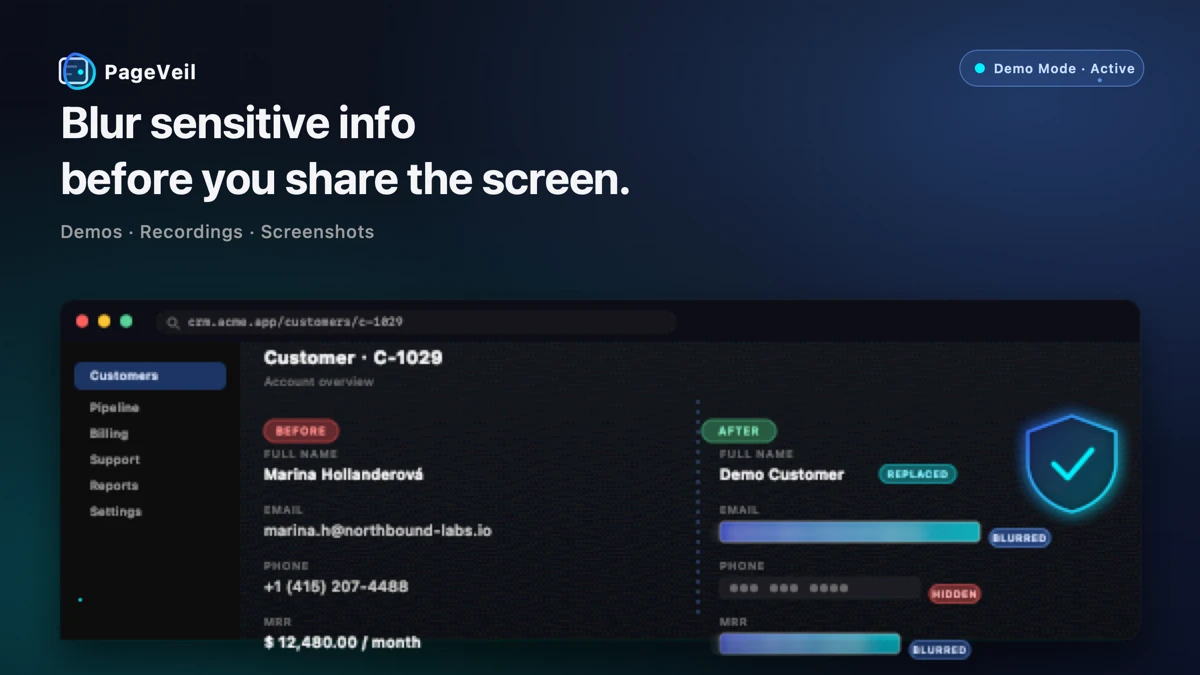
Most screen sharing mistakes happen before anyone notices them. A sales engineer opens a real customer dashboard. A support lead records a Loom. A founder shows production metrics during an investor demo. The page is useful because it is real, but that same page can expose names, emails, phone numbers, revenue, patient details, internal notes, or API keys.
PageVeil is built for that moment. It is a blur app and Chrome extension to blur private data on live webpages before the audience sees it.
Instead of editing a screenshot afterward or blurring a video frame by frame, PageVeil helps teams protect the webpage first. You can blur, hide, or replace sensitive information, then share the screen, record the walkthrough, or capture the screenshot from a safer state.
Use Case 1: Blur Sensitive Info Before Screen Sharing
The highest-risk screen shares are live calls where the presenter has to move quickly. Zoom, Google Meet, Teams, and customer calls leave little time to crop windows or cover fields manually.
PageVeil helps when you need to:
- Hide email and phone on a screen share
- Blur customer names, IDs, and billing fields
- Protect private notes inside CRMs, support tools, and admin panels
- Keep charts and dashboards visible while sensitive values stay unreadable
For recurring calls, saved rules can re-apply protections by URL, path, or domain. That makes PageVeil useful as a screen recording privacy tool and a live screen sharing privacy layer.
Explore screen sharing privacy
Use Case 2: Hide Customer Data During Sales Demos
Real product demos often work better than static demo environments. The problem is that production pages contain real customer data.
A practical demo privacy workflow needs more than a basic blur extension. Sales, success, and product teams often need to:
- Hide customer data during demo calls
- Replace real data with fake demo data
- Keep the page believable enough for the story
- Reuse the same setup before future demos
PageVeil supports blur, hard hide, and replacement. That means a customer name can become a safe placeholder, an email can become a fake demo email, and an order total can remain visually realistic without exposing the real value.
Use Case 3: Redact a Website for Screenshots
Screenshots move fast inside support, documentation, training, and product teams. They end up in tickets, docs, Slack, onboarding decks, public help centers, and internal knowledge bases.
If the screenshot is captured first and redacted later, the original file may already contain private data. A safer workflow is to redact the website before the screenshot is created.
PageVeil helps teams:
- Redact website data for screenshots
- Create a blurred page before capture
- Hide private fields in support tickets
- Prepare product documentation from live SaaS pages
- Reduce rework for Loom recordings and training videos
Use Case 4: Healthcare, Legal, Finance, and Regulated Workflows
Some teams search for a HIPAA screen sharing tool or GDPR screen sharing tool because the risk is concrete: the wrong field can expose patient, customer, employee, or financial data.
PageVeil is not a complete compliance program, and it does not replace your organization's legal, security, HIPAA, or GDPR process. It is a practical privacy layer that can help reduce accidental disclosure during screen shares, screenshots, recordings, demos, and training sessions.
Common fields to protect include:
| Data type | Examples |
|---|---|
| Personal data | Names, emails, phone numbers, addresses |
| Account data | Customer IDs, order IDs, ticket numbers |
| Financial data | Revenue, invoices, balances, plan details |
| Healthcare data | Patient identifiers, appointment notes, case details |
| Security data | API keys, tokens, internal URLs, admin notes |
Why Blurring the Webpage First Is Different
Post-production redaction has a place, but it starts after the private data has already been captured. PageVeil focuses on the live webpage before capture.
| Workflow | What happens |
|---|---|
| Manual window hiding | Fast for simple pages, fragile during live navigation |
| Screenshot editor | Useful after capture, but every asset needs a manual review |
| Video editor | Powerful after recording, but slow and easy to miss frames |
| PageVeil | Protects live webpage elements before screen sharing or capture |
That difference matters most when the same private fields appear repeatedly across product demos, support workflows, or training recordings.
What to Look for in a Chrome Extension to Blur Private Data
A useful chrome extension to blur private data should do more than place a rectangle over one area. For real teams, the important capabilities are:
- Element, region, and text selection
- Adjustable blur strength and hard hide
- Fake demo data replacement
- Saved rules that auto-apply
- Tab title and favicon masking
- One-click Demo Mode before a screen share
- Local-first processing for normal page protection
PageVeil combines those controls so teams can create a repeatable privacy workflow instead of relying on one-off redaction.
FAQ
Can I blur screen data before a Zoom or Meet call?
Yes. PageVeil protects the webpage before the call, so private data can be blurred, hidden, or replaced before viewers see your screen.
Can I hide email and phone numbers on screen share?
Yes. You can protect exact text, page elements, inputs, or selected regions that contain emails, phone numbers, customer names, account IDs, and other private details.
Can PageVeil replace real data with fake demo data?
Yes. Fake demo data replacement helps keep a page believable without showing real customer, patient, employee, or account data.
Is PageVeil a HIPAA or GDPR compliance solution?
No. PageVeil can help reduce accidental exposure during screen sharing and screenshots, but compliance depends on your organization's policies, systems, agreements, and legal obligations.
Final Thoughts
The best time to protect a sensitive webpage is before it becomes a shared screen, recording, screenshot, or training asset.
PageVeil helps teams blur screen data, hide customer details, redact websites for screenshots, and replace real values with fake demo data while keeping the product workflow visible.